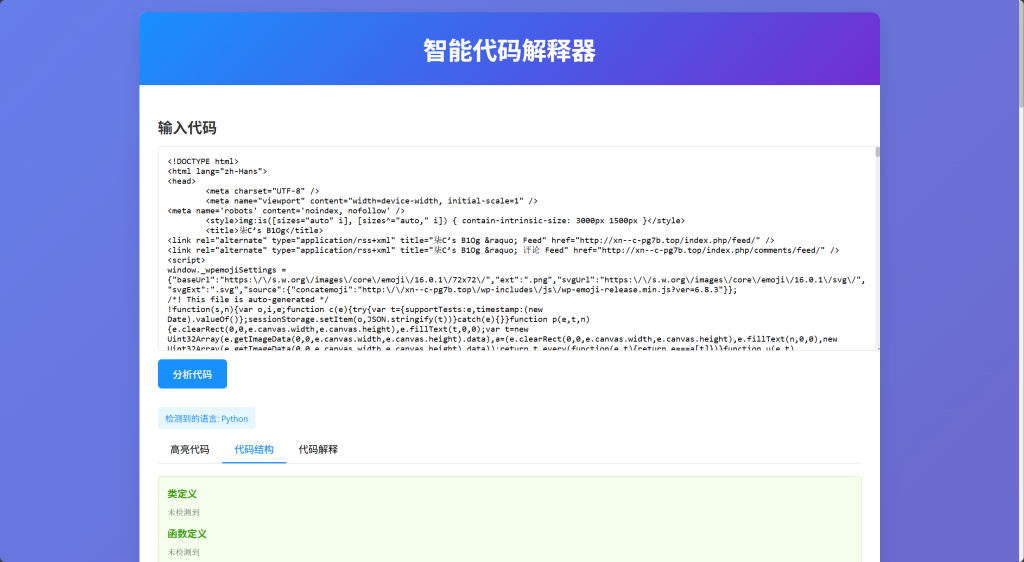
一个基于Web的智能代码解释器工具,调用本地AI大模型,可以自动识别代码语言,高亮显示代码,并提供代码结构分析和解释。
## 功能特点
– 📝 **代码语言自动识别**:智能检测输入代码的编程语言
– 🎨 **语法高亮显示**:美化代码展示,提高可读性
– 🏗️ **代码结构分析**:提取并展示代码中的类、函数、导入语句等结构
– 📖 **代码解释**:提供代码的详细解释(可选择使用OpenAI API获取更智能的解释)
– 💻 **用户友好界面**:简洁直观的Web界面,操作简单
## 安装说明
### 1. 安装依赖
“`bash
cd f:\TraeCN\智能代码解释器
pip install -r requirements.txt
“`
### 2. 配置OpenAI API(可选)
如果您希望使用OpenAI API获取更智能的代码解释,请按照以下步骤操作:
1. 复制`.env.example`文件并重命名为`.env`
2. 在`.env`文件中填入您的OpenAI API密钥
“`
OPENAI_API_KEY=your_api_key_here
“`
> 注意:即使没有OpenAI API密钥,工具仍然可以使用基本的代码分析功能。
## 使用方法
### 1. 启动应用
“`bash
python app.py
“`
### 2. 访问界面
打开浏览器,访问以下地址:
“`
http://localhost:5000
“`
### 3. 使用工具
1. 在代码输入框中粘贴或输入您想要分析的代码
2. 点击”分析代码”按钮
3. 在结果区域查看分析结果,包括:
– 高亮显示的代码
– 代码结构分析(类、函数、导入等)
– 代码解释
## 支持的语言
工具支持多种编程语言的识别和分析,包括但不限于:
– Python
– Java
– JavaScript
– TypeScript
– HTML
– CSS
– C/C++
– C#
– Go
– Rust
– PHP
– Ruby
– Swift
– Kotlin
– SQL
– Shell/Bash
– JSON/XML/YAML
## 技术栈
– **后端**:Python, Flask
– **前端**:HTML, CSS, JavaScript
– **代码高亮**:Pygments
– **语言检测**:langdetect
– **智能解释**:可选的OpenAI API集成
## 注意事项
1. 为了获得最佳体验,请使用现代浏览器(Chrome, Firefox, Edge等)
2. 大型代码文件可能需要较长时间处理
3. 使用OpenAI API需要有效的API密钥,并且可能产生费用
4. 工具仅在本地运行,不会上传您的代码到任何服务器
## 扩展与贡献
如果您想扩展或改进此工具,欢迎提交Issue或Pull Request。
## 许可证
此项目采用MIT许可证。
<!DOCTYPE html>
<html lang="zh-CN">
<head>
<meta charset="UTF-8">
<meta name="viewport" content="width=device-width, initial-scale=1.0">
<title>智能代码解释器</title>
<style>
body {
font-family: -apple-system, BlinkMacSystemFont, 'Segoe UI', Roboto, 'Helvetica Neue', Arial, sans-serif;
background: linear-gradient(135deg, #667eea 0%, #764ba2 100%);
margin: 0;
padding: 20px;
min-height: 100vh;
}
.container {
max-width: 1200px;
margin: 0 auto;
background: white;
border-radius: 12px;
box-shadow: 0 8px 32px rgba(0,0,0,0.1);
overflow: hidden;
}
.header {
background: linear-gradient(135deg, #1890ff 0%, #722ed1 100%);
color: white;
padding: 30px;
text-align: center;
}
.header h1 {
margin: 0;
font-size: 2.5em;
font-weight: 600;
}
.content {
padding: 30px;
}
.input-section {
margin-bottom: 30px;
}
.input-section h2,
.result-section h2 {
color: #333;
margin-bottom: 15px;
font-weight: 600;
}
#code-input {
width: 100%;
min-height: 300px;
padding: 15px;
border: 1px solid #d9d9d9;
border-radius: 6px;
font-family: 'Consolas', 'Monaco', 'Courier New', monospace;
font-size: 14px;
resize: vertical;
}
#analyze-btn {
background: #1890ff;
color: white;
border: none;
padding: 12px 24px;
margin-top: 10px;
border-radius: 6px;
cursor: pointer;
font-size: 16px;
font-weight: 500;
transition: background 0.3s;
}
#analyze-btn:hover {
background: #40a9ff;
}
.result-section {
display: none;
}
.result-tabs {
display: flex;
border-bottom: 1px solid #d9d9d9;
margin-bottom: 20px;
}
.tab {
padding: 10px 20px;
cursor: pointer;
border-bottom: 2px solid transparent;
transition: all 0.3s;
}
.tab.active {
color: #1890ff;
border-bottom-color: #1890ff;
font-weight: 500;
}
.tab-content {
display: none;
}
.tab-content.active {
display: block;
}
.highlight-box {
background: #f5f5f5;
border: 1px solid #d9d9d9;
border-radius: 6px;
padding: 0;
overflow-x: auto;
position: relative;
}
.code-with-line-numbers {
display: flex;
font-family: 'Consolas', 'Monaco', 'Courier New', monospace;
font-size: 14px;
}
.line-numbers {
background: #e8e8e8;
color: #666;
padding: 15px 10px;
text-align: right;
user-select: none;
border-right: 1px solid #d9d9d9;
min-width: 40px;
}
.line-number {
display: block;
line-height: 1.5;
font-size: 14px;
}
.code-content {
padding: 15px;
white-space: pre-wrap;
word-wrap: break-word;
flex: 1;
}
/* 基于功能的代码高亮 */
.keyword { color: #708; font-weight: bold; }
.string { color: #a31515; }
.comment { color: #008000; font-style: italic; }
.number { color: #098658; }
.operator { color: #0000ff; font-weight: bold; }
.function { color: #795e26; }
.variable { color: #000000; }
.class { color: #267f99; font-weight: bold; }
.import { color: #001080; }
.control-structure { color: #af00db; font-weight: bold; }
.language-info {
background: #e6f7ff;
color: #1890ff;
padding: 8px 12px;
border-radius: 4px;
font-size: 14px;
display: inline-block;
margin-bottom: 10px;
}
.structure-info {
background: #f6ffed;
border: 1px solid #b7eb8f;
border-radius: 6px;
padding: 15px;
margin-bottom: 20px;
}
.structure-item {
margin-bottom: 10px;
}
.structure-item h4 {
margin: 0 0 8px 0;
color: #389e0d;
font-weight: 600;
}
.structure-list {
list-style: none;
padding: 0;
margin: 0;
}
.structure-list li {
padding: 4px 0;
font-family: 'Consolas', 'Monaco', 'Courier New', monospace;
font-size: 13px;
color: #595959;
}
.explanation-box {
background: #fff7e6;
border: 1px solid #ffd591;
border-radius: 6px;
padding: 25px;
line-height: 1.7;
color: #d46b08;
overflow-x: auto;
text-align: left;
}
.explanation-box h1,
.explanation-box h2,
.explanation-box h3,
.explanation-box h4,
.explanation-box h5,
.explanation-box h6 {
margin-top: 30px;
margin-bottom: 15px;
color: #d46b08;
font-weight: 600;
clear: both;
}
.explanation-box h1 { font-size: 2em; }
.explanation-box h2 {
font-size: 1.7em;
border-bottom: 2px solid #ffd591;
padding-bottom: 8px;
margin-top: 40px;
}
.explanation-box h3 {
font-size: 1.4em;
margin-top: 30px;
}
.explanation-box h4 {
font-size: 1.2em;
margin-top: 25px;
}
.explanation-box h5 { font-size: 1.1em; }
.explanation-box h6 { font-size: 1em; }
.explanation-box ul,
.explanation-box ol {
margin: 15px 0;
padding-left: 30px;
}
.explanation-box ul ul,
.explanation-box ul ol,
.explanation-box ol ul,
.explanation-box ol ol {
margin: 8px 0;
padding-left: 25px;
}
.explanation-box li {
margin: 10px 0;
line-height: 1.6;
text-align: left;
}
.explanation-box pre {
background: #f0f0f0;
border-radius: 6px;
padding: 15px;
overflow-x: auto;
margin: 20px 0;
font-family: 'Consolas', 'Monaco', 'Courier New', monospace;
font-size: 13px;
border: 1px solid #e0e0e0;
}
.explanation-box code {
background: #f5f5f5;
padding: 3px 6px;
border-radius: 3px;
font-family: 'Consolas', 'Monaco', 'Courier New', monospace;
font-size: 0.9em;
border: 1px solid #e8e8e8;
}
.explanation-box pre code {
background: none;
padding: 0;
border: none;
}
.explanation-box strong {
font-weight: 700;
color: #a84700;
}
.explanation-box p {
margin: 15px 0;
text-align: left;
line-height: 1.7;
}
.loading-overlay {
display: none;
position: fixed;
top: 0;
left: 0;
right: 0;
bottom: 0;
background: rgba(0, 0, 0, 0.5);
z-index: 1000;
justify-content: center;
align-items: center;
}
.loading-spinner {
background: white;
padding: 30px;
border-radius: 8px;
text-align: center;
}
.loading-spinner span {
display: block;
margin-top: 10px;
color: #333;
}
@media (max-width: 768px) {
.container {
border-radius: 8px;
}
.header h1 {
font-size: 2em;
}
.content {
padding: 20px;
}
.result-tabs {
flex-wrap: wrap;
}
.tab {
padding: 8px 16px;
font-size: 14px;
}
}
/* 滚动条样式 */
::-webkit-scrollbar {
width: 8px;
height: 8px;
}
::-webkit-scrollbar-track {
background: #f1f1f1;
border-radius: 4px;
}
::-webkit-scrollbar-thumb {
background: #c1c1c1;
border-radius: 4px;
}
::-webkit-scrollbar-thumb:hover {
background: #a8a8a8;
}
/* 加载动画 */
@keyframes spin {
0% { transform: rotate(0deg); }
100% { transform: rotate(360deg); }
}
</style>
</head>
<body>
<div class="container">
<div class="header">
<h1>智能代码解释器</h1>
</div>
<div class="content">
<div class="input-section">
<h2>输入代码</h2>
<textarea id="code-input" placeholder="请在此粘贴或输入代码..."></textarea>
<button id="analyze-btn">分析代码</button>
</div>
<div class="result-section" id="result-section">
<div class="language-info" id="language-info">检测到的语言: <span id="detected-language">Python</span></div>
<div class="result-tabs">
<div class="tab active" data-tab="highlight">高亮代码</div>
<div class="tab" data-tab="structure">代码结构</div>
<div class="tab" data-tab="explanation">代码解释</div>
</div>
<div class="tab-content active" id="highlight-content">
<style id="highlight-css"></style>
<div class="highlight-box">
<div id="code-with-line-numbers" class="code-with-line-numbers">
<div class="line-numbers" id="line-numbers"></div>
<div class="code-content" id="code-content"></div>
</div>
</div>
</div>
<div class="tab-content" id="structure-content">
<div class="structure-info">
<div class="structure-item">
<h4>类定义</h4>
<ul class="structure-list" id="classes-list"></ul>
</div>
<div class="structure-item">
<h4>函数定义</h4>
<ul class="structure-list" id="functions-list"></ul>
</div>
<div class="structure-item">
<h4>导入语句</h4>
<ul class="structure-list" id="imports-list"></ul>
</div>
<div class="structure-item">
<h4>变量声明</h4>
<ul class="structure-list" id="variables-list"></ul>
</div>
<div class="structure-item">
<h4>控制结构</h4>
<ul class="structure-list" id="control-structures-list"></ul>
</div>
</div>
</div>
<div class="tab-content" id="explanation-content">
<div class="explanation-box" id="code-explanation"></div>
</div>
</div>
</div>
</div>
<div class="loading-overlay" id="loading-overlay">
<div class="loading-spinner">
<div style="width: 40px; height: 40px; margin: 0 auto; border: 4px solid #f3f3f3; border-top: 4px solid #1890ff; border-radius: 50%; animation: spin 1s linear infinite;"></div>
<span>正在分析代码,请稍候...</span>
</div>
</div>
<script>
// 加载动画
const loadingOverlay = document.getElementById('loading-overlay');
function showLoading() {
loadingOverlay.style.display = 'flex';
}
function hideLoading() {
loadingOverlay.style.display = 'none';
}
// 选项卡切换
const tabs = document.querySelectorAll('.tab');
tabs.forEach(tab => {
tab.addEventListener('click', () => {
// 移除所有活动状态
document.querySelectorAll('.tab').forEach(t => t.classList.remove('active'));
document.querySelectorAll('.tab-content').forEach(c => c.classList.remove('active'));
// 添加当前活动状态
tab.classList.add('active');
const tabId = tab.getAttribute('data-tab');
document.getElementById(`${tabId}-content`).classList.add('active');
});
});
// 分析按钮点击事件
document.getElementById('analyze-btn').addEventListener('click', () => {
const code = document.getElementById('code-input').value;
if (!code.trim()) {
alert('请输入代码后再分析');
return;
}
showLoading();
// 发送AJAX请求
fetch('/analyze', {
method: 'POST',
headers: {
'Content-Type': 'application/json'
},
body: JSON.stringify({ code })
})
.then(response => response.json())
.then(data => {
hideLoading();
if (data.error) {
alert('错误: ' + data.error);
return;
}
try {
// 安全地访问数据,提供默认值
const safeData = {
language: data.language || '未知',
css: data.css || '',
code: data.code || '',
highlighted_code: data.highlighted_code || '',
analysis: data.analysis || {},
explanation: data.explanation || '无法生成代码解释。'
};
// 更新语言信息
document.getElementById('detected-language').textContent = safeData.language;
// 更新高亮代码和行号
document.getElementById('highlight-css').textContent = safeData.css;
// 生成行号
const codeForLineNumbers = safeData.code || safeData.highlighted_code;
const codeLines = codeForLineNumbers ? codeForLineNumbers.split('\n') : [''];
const lineNumbersContainer = document.getElementById('line-numbers');
lineNumbersContainer.innerHTML = '';
codeLines.forEach((line, index) => {
const lineNumber = document.createElement('span');
lineNumber.className = 'line-number';
lineNumber.textContent = index + 1;
lineNumbersContainer.appendChild(lineNumber);
});
// 安全地更新代码内容
try {
if (safeData.code) {
document.getElementById('code-content').innerHTML = highlightCodeByFunctionality(safeData.code, safeData.language);
} else {
document.getElementById('code-content').innerHTML = safeData.highlighted_code;
}
} catch (e) {
console.error('代码高亮失败:', e);
document.getElementById('code-content').textContent = safeData.code || safeData.highlighted_code || '无法显示代码';
}
// 安全地更新代码结构
const analysis = safeData.analysis;
updateStructureList('classes-list', Array.isArray(analysis.classes) ? analysis.classes : [], 'name');
updateStructureList('functions-list', Array.isArray(analysis.functions) ? analysis.functions : [], 'name');
updateStructureList('imports-list', Array.isArray(analysis.imports) ? analysis.imports : [], 'content');
updateStructureList('variables-list', Array.isArray(analysis.variables) ? analysis.variables : [], 'name');
updateStructureList('control-structures-list', Array.isArray(analysis.control_structures) ? analysis.control_structures : [], 'content');
// 安全地更新代码解释
try {
const formattedExplanation = formatMarkdown(safeData.explanation);
document.getElementById('code-explanation').innerHTML = formattedExplanation;
} catch (e) {
console.error('Markdown格式化失败:', e);
document.getElementById('code-explanation').textContent = safeData.explanation;
}
// 显示结果部分
document.getElementById('result-section').style.display = 'block';
} catch (e) {
console.error('处理分析结果时出错:', e);
alert('显示结果时出现错误。请检查控制台获取更多信息。');
}
})
.catch(error => {
hideLoading();
alert('分析过程中出错: ' + error.message);
});
});
// 更新结构列表
function updateStructureList(elementId, items, displayKey) {
const listElement = document.getElementById(elementId);
listElement.innerHTML = '';
if (items.length === 0) {
listElement.innerHTML = '<li>未检测到</li>';
return;
}
// 显示所有项目,不做任何截断
items.forEach(item => {
const li = document.createElement('li');
li.textContent = `第${item.line}行: ${item[displayKey]}`;
listElement.appendChild(li);
});
}
// 基于功能的代码高亮函数 - 安全版本
function highlightCodeByFunctionality(code, language) {
try {
// 安全检查输入
if (!code || typeof code !== 'string') {
return code || '';
}
if (!language || typeof language !== 'string') {
language = 'plaintext';
}
// 不同语言的关键字和规则
const keywords = {
'python': ['def', 'class', 'if', 'elif', 'else', 'for', 'while', 'in', 'return', 'import', 'from', 'as', 'try', 'except', 'finally', 'with', 'lambda', 'pass', 'continue', 'break', 'and', 'or', 'not', 'is', 'None', 'True', 'False'],
'javascript': ['function', 'var', 'let', 'const', 'if', 'else', 'for', 'while', 'do', 'return', 'import', 'export', 'try', 'catch', 'finally', 'class', 'extends', 'super', 'new', 'this', 'typeof', 'instanceof', 'in', 'continue', 'break', 'switch', 'case', 'default', 'throw', 'async', 'await', 'true', 'false', 'null', 'undefined'],
'java': ['public', 'private', 'protected', 'class', 'interface', 'extends', 'implements', 'static', 'final', 'if', 'else', 'for', 'while', 'do', 'return', 'import', 'package', 'try', 'catch', 'finally', 'throw', 'throws', 'new', 'this', 'super', 'void', 'int', 'long', 'double', 'float', 'boolean', 'char', 'byte', 'short', 'true', 'false', 'null', 'continue', 'break', 'switch', 'case', 'default'],
'cpp': ['class', 'struct', 'public', 'private', 'protected', 'if', 'else', 'for', 'while', 'do', 'return', '#include', 'using', 'namespace', 'try', 'catch', 'throw', 'new', 'delete', 'this', 'const', 'static', 'virtual', 'override', 'final', 'int', 'long', 'double', 'float', 'bool', 'char', 'void', 'unsigned', 'signed', 'short', 'continue', 'break', 'switch', 'case', 'default', 'true', 'false', 'nullptr']
};
let highlightedCode = code;
// 转义HTML特殊字符
highlightedCode = highlightedCode
.replace(/&/g, '&')
.replace(/</g, '<')
.replace(/>/g, '>')
.replace(/"/g, '"')
.replace(/'/g, ''');
// 安全地高亮注释
try {
// Python
if (language === 'python') {
highlightedCode = highlightedCode.replace(/#.*$/gm, '<span class="comment">$&</span>');
}
// C-like languages
else {
// 单行注释
highlightedCode = highlightedCode.replace(/\/\/.*$/gm, '<span class="comment">$&</span>');
// 多行注释 (安全实现)
highlightedCode = highlightedCode.replace(/\/\*[\s\S]*?\*\//g, '<span class="comment">$&</span>');
}
} catch (e) {
console.error('注释高亮失败:', e);
}
// 安全地高亮字符串
try {
highlightedCode = highlightedCode.replace(/"([^"\\]|\\.)*"/g, '<span class="string">$&</span>');
highlightedCode = highlightedCode.replace(/'([^'\\]|\\.)*'/g, '<span class="string">$&</span>');
} catch (e) {
console.error('字符串高亮失败:', e);
}
// 安全地高亮数字
try {
highlightedCode = highlightedCode.replace(/\b\d+(\.\d+)?\b/g, '<span class="number">$&</span>');
} catch (e) {
console.error('数字高亮失败:', e);
}
// 安全地高亮运算符 - 修复正则表达式
try {
const operators = ['+', '-', '*', '/', '%', '=', '==', '!=', '<', '>', '<=', '>=', '&&', '||', '!', '++', '--', '+=', '-=', '*=', '/=', '%=', '<<', '>>', '>>>', '|', '&', '^', '~'];
// 按照运算符长度排序,长的先处理
operators.sort((a, b) => b.length - a.length);
operators.forEach(op => {
try {
// 正确转义所有特殊字符
const escapedOp = op.replace(/[.*+?^${}()|[\]\\]/g, '\\$&');
// 避免使用单词边界,因为运算符不是单词字符
const regex = new RegExp(`(${escapedOp})`, 'g');
highlightedCode = highlightedCode.replace(regex, '<span class="operator">$1</span>');
} catch (e) {
console.error(`运算符高亮失败 (${op}):`, e);
}
});
} catch (e) {
console.error('运算符高亮总体失败:', e);
}
// 安全地高亮关键字
try {
const langKeywords = keywords[language.toLowerCase()] || [];
langKeywords.forEach(keyword => {
try {
const escapedKeyword = keyword.replace(/[.*+?^${}()|[\]\\]/g, '\\$&');
highlightedCode = highlightedCode.replace(new RegExp(`\\b${escapedKeyword}\\b`, 'g'), '<span class="keyword">$&</span>');
} catch (e) {
console.error(`关键字高亮失败 (${keyword}):`, e);
}
});
} catch (e) {
console.error('关键字高亮总体失败:', e);
}
// 安全地高亮函数 - 修复捕获组问题
try {
if (language === 'python') {
highlightedCode = highlightedCode.replace(/def\s+(\w+)\s*\(/g, 'def <span class="function">$1</span> (');
} else if (language === 'javascript' || language === 'java' || language === 'cpp') {
highlightedCode = highlightedCode.replace(/function\s+(\w+)\s*\(/g, 'function <span class="function">$1</span> (');
// 修复捕获组编号错误
highlightedCode = highlightedCode.replace(/\b(\w+)\s+(\w+)\s*\(/g, '$1 <span class="function">$2</span> (');
}
} catch (e) {
console.error('函数高亮失败:', e);
}
// 安全地高亮类
try {
highlightedCode = highlightedCode.replace(/class\s+(\w+)/g, 'class <span class="class">$1</span>');
} catch (e) {
console.error('类高亮失败:', e);
}
// 安全地高亮导入
try {
if (language === 'python') {
highlightedCode = highlightedCode.replace(/import\s+(\w+)/g, '<span class="import">import</span> <span class="variable">$1</span>');
highlightedCode = highlightedCode.replace(/from\s+(\w+)\s+import/g, '<span class="import">from</span> <span class="variable">$1</span> <span class="import">import</span>');
}
} catch (e) {
console.error('导入高亮失败:', e);
}
return highlightedCode;
} catch (e) {
console.error('代码高亮总体失败:', e);
// 发生错误时,至少转义HTML特殊字符并返回
if (code && typeof code === 'string') {
return code
.replace(/&/g, '&')
.replace(/</g, '<')
.replace(/>/g, '>')
.replace(/"/g, '"')
.replace(/'/g, ''');
}
return code || '';
}
}
// 改进的Markdown格式化
function formatMarkdown(text) {
try {
// 安全检查输入
if (!text || typeof text !== 'string') {
return text || '';
}
// 替换制表符为空格,防止格式混乱
text = text.replace(/\t/g, ' ');
// 首先处理代码块 (```)
let codeBlocks = [];
let codeBlockCounter = 0;
text = text.replace(/```[\s\S]*?```/g, (match) => {
const codeBlockId = `CODE_BLOCK_PLACEHOLDER_${codeBlockCounter++}`;
codeBlocks.push(match);
return codeBlockId;
});
// 特殊处理行号标记,确保它们在代码块外正确显示
text = text.replace(/\*\*\[行号 (\d+)\]\*\*:\s*`([^`]+)`/g, '<p><strong>[行号 $1]</strong>: <code>$2</code></p>');
// 处理行内代码和粗体
text = text.replace(/`(.*?)`/g, '<code>$1</code>');
text = text.replace(/\*\*(.*?)\*\*/g, '<strong>$1</strong>');
// 处理标题
text = text.replace(/^# (.*?)$/gm, '<h1>$1</h1>');
text = text.replace(/^## (.*?)$/gm, '<h2>$1</h2>');
text = text.replace(/^### (.*?)$/gm, '<h3>$1</h3>');
text = text.replace(/^#### (.*?)$/gm, '<h4>$1</h4>');
text = text.replace(/^##### (.*?)$/gm, '<h5>$1</h5>');
text = text.replace(/^###### (.*?)$/gm, '<h6>$1</h6>');
// 拆分段落
const paragraphs = text.split(/\n\n+/);
let result = '';
// 处理每个段落
paragraphs.forEach(paragraph => {
paragraph = paragraph.trim();
if (!paragraph) return;
// 检查是否已经被处理为标题或行号标记
if (paragraph.match(/^<h[1-6]>/) && paragraph.match(/<\/h[1-6]>$/)) {
result += paragraph + '\n';
return;
}
if (paragraph.match(/^<p><strong>\[行号/)) {
result += paragraph;
return;
}
// 检查是否是列表
if (paragraph.match(/^(\s*[-*]|\s*\d+\.) /m)) {
// 处理列表
let inList = false;
let currentListLevel = 0;
let listContent = '';
const listLines = paragraph.split('\n');
listLines.forEach(line => {
line = line.trim();
if (!line) return;
// 计算列表缩进级别
let level = 0;
const indentMatch = line.match(/^(\s*)/)[0];
level = Math.floor(indentMatch.length / 4);
// 提取列表标记和内容
const listMatch = line.match(/^(\s*[-*]|\s*\d+\.)\s+(.*)$/);
if (listMatch) {
const content = listMatch[2];
// 处理列表嵌套
while (currentListLevel > level) {
listContent += '</li></ul>';
currentListLevel--;
}
while (currentListLevel < level) {
listContent += '<ul>';
currentListLevel++;
}
if (!inList) {
listContent += '<ul>';
currentListLevel++;
inList = true;
} else if (currentListLevel === level) {
// 同一级别的下一个列表项
listContent += '</li>';
}
listContent += `<li>${content}`;
}
});
// 关闭所有未闭合的列表标签
while (currentListLevel > 0) {
listContent += '</li></ul>';
currentListLevel--;
}
result += listContent;
} else {
// 普通段落
result += `<p>${paragraph}</p>`;
}
});
// 恢复代码块
codeBlocks.forEach((codeBlock, index) => {
const codeContent = codeBlock.slice(codeBlock.indexOf('\n') + 1, codeBlock.lastIndexOf('\n'));
result = result.replace(`CODE_BLOCK_PLACEHOLDER_${index}`, `<pre><code>${codeContent}</code></pre>`);
});
return result;
} catch (e) {
console.error('Markdown格式化错误:', e);
// 返回原始文本而不进行格式化
return text || '';
}
}
</script>
</body>
</html># Ollama配置
# 本地Ollama可执行文件路径
OLLAMA_PATH=F:\\OllamaAI\\ollama.exe
# 使用的模型名称
OLLAMA_MODEL=deepseek-r1:14b# Ollama配置示例
# 本地Ollama可执行文件路径
OLLAMA_PATH=F:\\OllamaAI\\ollama.exe
# 使用的模型名称
OLLAMA_MODEL=deepseek-r1:14b# -*- coding: utf-8 -*-
from flask import Flask, render_template, request, jsonify
import os
import re
import subprocess
import json
from pygments import highlight
from pygments.lexers import guess_lexer, get_lexer_by_name
from pygments.formatters import HtmlFormatter
import langdetect
from dotenv import load_dotenv
import traceback
import time
import threading
from concurrent.futures import ThreadPoolExecutor
# 加载环境变量
load_dotenv()
app = Flask(__name__)
# Ollama配置 - 修复路径格式问题
OLLAMA_PATH = os.getenv('OLLAMA_PATH', 'F:\\OllamaAI\\ollama.exe')
# 备选路径列表,增加找到Ollama的可能性
OLLAMA_PATHS = [
OLLAMA_PATH,
'F:/OllamaAI/ollama.exe',
'C:/Program Files/Ollama/ollama.exe',
'C:/Program Files (x86)/Ollama/ollama.exe',
'ollama.exe' # 尝试在PATH中查找
]
# 确保使用存在的Ollama路径
for path in OLLAMA_PATHS:
if os.path.exists(path):
OLLAMA_PATH = path
break
OLLAMA_MODEL = os.getenv('OLLAMA_MODEL', 'deepseek-r1:14b')
# 语言映射字典,用于将技术语言名称映射为常用名称
LANGUAGE_MAPPING = {
'python': 'Python',
'javascript': 'JavaScript',
'java': 'Java',
'c++': 'C++',
'c#': 'C#',
'ruby': 'Ruby',
'go': 'Go',
'rust': 'Rust',
'php': 'PHP',
'swift': 'Swift',
'kotlin': 'Kotlin',
'typescript': 'TypeScript',
'html': 'HTML',
'css': 'CSS',
'sql': 'SQL',
'shell': 'Shell脚本',
'bash': 'Bash脚本',
'powershell': 'PowerShell',
'plaintext': '纯文本'
}
# 使用线程池提高性能
executor = ThreadPoolExecutor(max_workers=8)
def analyze_code_structure(code):
"""完整分析代码结构,提取所有关键信息"""
result = {
'imports': [],
'classes': [],
'functions': [],
'variables': [],
'control_structures': []
}
lines = code.split('\n')
# 分析所有代码行,不限制行数
for i, line in enumerate(lines, 1):
line_stripped = line.strip()
# 跳过空行和注释,提高处理速度
if not line_stripped or line_stripped.startswith('#') or line_stripped.startswith('//'):
continue
# 使用字符串方法提高性能
if line_stripped.startswith('import ') or line_stripped.startswith('from '):
# 提取导入信息
result['imports'].append({
'line': i,
'content': line_stripped
})
elif line_stripped.startswith('class '):
# 提取类名
class_name = line_stripped.split('class ')[1].split('(')[0].split(':')[0].strip()
result['classes'].append({
'line': i,
'name': class_name,
'content': line_stripped
})
elif line_stripped.startswith('def ') or line_stripped.startswith('function '):
# 提取函数名
func_parts = line_stripped.split('(')[0]
if func_parts.startswith('def '):
func_name = func_parts.split('def ')[1].strip()
else:
func_name = func_parts.split('function ')[1].strip()
result['functions'].append({
'line': i,
'name': func_name,
'content': line_stripped
})
elif line_stripped.startswith('if ') or line_stripped.startswith('for ') or \
line_stripped.startswith('while ') or line_stripped.startswith('switch ') or \
line_stripped.startswith('try') or line_stripped.startswith('catch') or \
line_stripped.startswith('finally') or line_stripped.startswith('else'):
# 识别控制结构
result['control_structures'].append({
'line': i,
'content': line_stripped
})
elif '=' in line_stripped and not any(op in line_stripped for op in ['==', '!=', '<=', '>=']):
# 识别变量赋值
var_name = line_stripped.split('=')[0].strip().split(' ')[-1]
result['variables'].append({
'line': i,
'name': var_name,
'content': line_stripped
})
return result
# 详细代码解释函数 - 本地版本
def detailed_local_explain(code, language, analysis):
"""生成详细的代码解释,保留所有代码结构信息和完整分析"""
explanation = f"# {language}代码详细分析\n\n"
# 完整的整体结构分析
explanation += "## 代码结构概览\n\n"
explanation += f"- 代码行数: {len(code.split('\n'))}\n"
if analysis.get('classes'):
explanation += f"- 类数量: {len(analysis['classes'])}\n"
for cls in analysis['classes']:
explanation += f" - {cls['name']} (第{cls['line']}行)\n"
if analysis.get('functions'):
explanation += f"- 函数数量: {len(analysis['functions'])}\n"
for func in analysis['functions']:
explanation += f" - {func['name']} (第{func['line']}行)\n"
if analysis.get('imports'):
explanation += f"- 导入语句: {len(analysis['imports'])}个\n"
if analysis.get('variables'):
explanation += f"- 变量声明: {len(analysis['variables'])}个\n"
if analysis.get('control_structures'):
explanation += f"- 控制结构: {len(analysis['control_structures'])}个\n"
# 详细分析类定义
if analysis.get('classes'):
explanation += "\n## 类定义详情\n\n"
for cls in analysis['classes']:
explanation += f"- **第{cls['line']}行**: `{cls['content']}`\n"
explanation += f" - 类名: {cls['name']}\n"
# 提取继承信息
if '(' in cls['content'] and ')' in cls['content']:
parent_class = cls['content'].split('(')[1].split(')')[0].strip()
explanation += f" - 继承关系: 继承自 {parent_class}\n"
else:
explanation += " - 继承关系: 无显式继承\n"
explanation += " - 作用: 定义了一个新的数据类型,封装相关数据和方法\n"
# 详细分析函数定义
if analysis.get('functions'):
explanation += "\n## 函数定义详情\n\n"
for func in analysis['functions']:
explanation += f"- **第{func['line']}行**: `{func['content']}`\n"
explanation += f" - 函数名: {func['name']}\n"
# 提取参数信息
if '(' in func['content'] and ')' in func['content']:
params_str = func['content'].split('(')[1].split(')')[0].strip()
if params_str:
params = [p.strip() for p in params_str.split(',')]
explanation += f" - 参数: {', '.join(params)}\n"
else:
explanation += " - 参数: 无参数\n"
explanation += " - 作用: 封装可重用的代码逻辑,执行特定任务\n"
# 完整的代码逐行分析
explanation += "\n## 代码逐行分析\n\n"
explanation += "以下是代码的详细逐行分析:\n\n"
lines = code.split('\n')
# 分析所有代码行,不限制行数
for i, line in enumerate(lines, 1):
original_line = line
line = line.strip()
if not line:
explanation += f"**[行{i}]**: `[空行]`\n"
elif line.startswith('#') or line.startswith('//'):
explanation += f"**[行{i}]**: `{original_line}`\n"
explanation += " - 注释行:提供代码解释,不执行\n"
else:
explanation += f"**[行{i}]**: `{original_line}`\n"
# 详细分析各种代码类型
if line.startswith('import ') or line.startswith('from '):
explanation += " - 导入语句:引入外部模块或库\n"
# 分析导入类型
if 'as' in line:
parts = line.split('as')
imported = parts[0].strip()
alias = parts[1].strip()
explanation += f" - 导入内容: {imported.replace('import', '').strip()},别名: {alias}\n"
elif 'from' in line:
parts = line.split('import')
module = parts[0].replace('from', '').strip()
components = parts[1].strip()
explanation += f" - 从 {module} 导入: {components}\n"
elif line.startswith('class '):
explanation += " - 类定义:创建一个新的类\n"
elif line.startswith('def ') or line.startswith('function '):
explanation += " - 函数定义:创建一个可重用的代码块\n"
elif '=' in line and not any(op in line for op in ['==', '!=', '<=', '>=']):
explanation += " - 变量赋值:给变量分配值\n"
# 分析赋值运算符
if '+=' in line:
explanation += " - '+=' 加法赋值运算符:将右侧值加到左侧变量并赋值\n"
elif '-=' in line:
explanation += " - '-=' 减法赋值运算符:从左侧变量减去右侧值并赋值\n"
elif '*=' in line:
explanation += " - '*=' 乘法赋值运算符:将左侧变量乘以右侧值并赋值\n"
elif '/=' in line:
explanation += " - '/=' 除法赋值运算符:将左侧变量除以右侧值并赋值\n"
else:
var_name = line.split('=')[0].strip()
value_part = line.split('=')[1].strip() if '=' in line else ''
explanation += f" - 变量名: {var_name}\n"
if value_part:
explanation += f" - 赋值内容: {value_part}\n"
elif line.startswith('if ') or line.startswith('else ') or line.startswith('elif '):
explanation += " - 条件语句:根据条件执行不同代码\n"
if 'if' in line:
condition = line.split('if')[1].split(':')[0].strip()
explanation += f" - 条件表达式: {condition}\n"
elif line.startswith('for ') or line.startswith('while '):
explanation += " - 循环语句:重复执行代码块\n"
if 'for' in line:
loop_info = line.split('for')[1].split(':')[0].strip()
explanation += f" - 循环条件: {loop_info}\n"
elif 'while' in line:
loop_condition = line.split('while')[1].split(':')[0].strip()
explanation += f" - 循环条件: {loop_condition}\n"
elif line.startswith('return '):
explanation += " - 返回语句:从函数返回值\n"
return_value = line.split('return')[1].strip() if 'return' in line else ''
if return_value:
explanation += f" - 返回值: {return_value}\n"
elif line.startswith('print(') or line.startswith('console.log('):
explanation += " - 输出语句:打印信息到控制台\n"
elif line.startswith('try:') or line.startswith('catch') or line.startswith('except') or line.startswith('finally:'):
explanation += " - 异常处理:捕获和处理运行时错误\n"
elif line.startswith('break') or line.startswith('continue'):
explanation += " - 流程控制:中断或继续循环\n"
elif line.startswith('def '):
explanation += " - 函数定义:创建一个新函数\n"
func_name = line.split('def ')[1].split('(')[0].strip()
explanation += f" - 函数名: {func_name}\n"
# 分析运算符
operators = {
'+': '加法运算符',
'-': '减法运算符',
'*': '乘法运算符',
'/': '除法运算符',
'%': '取模运算符',
'**': '幂运算符',
'//': '整除运算符',
'==': '等于运算符',
'!=': '不等运算符',
'<': '小于运算符',
'>': '大于运算符',
'<=': '小于等于运算符',
'>=': '大于等于运算符',
'and': '逻辑与运算符',
'or': '逻辑或运算符',
'not': '逻辑非运算符'
}
# 检查是否包含运算符并解释
for op, desc in operators.items():
# 避免将复合运算符中的部分单独识别
if op in line and not any(full_op in line for full_op in [op+'=', op+op, op+' ']):
explanation += f" - {op} {desc}\n"
# 提供更详细的运算符说明
op_details = {
'+': '用于数值相加或字符串拼接',
'-': '用于数值相减',
'*': '用于数值相乘',
'/': '用于浮点除法,得到浮点数结果',
'%': '计算除法的余数',
'**': '计算幂次方,如 2**3 = 8',
'//': '整除运算符,结果取整',
'==': '比较两个值是否相等',
'!=': '比较两个值是否不相等',
'<': '比较左侧值是否小于右侧值',
'>': '比较左侧值是否大于右侧值',
'<=': '比较左侧值是否小于或等于右侧值',
'>=': '比较左侧值是否大于或等于右侧值',
'and': '逻辑与,两个条件都为真时结果为真',
'or': '逻辑或,至少一个条件为真时结果为真',
'not': '逻辑非,取反布尔值'}
if op in op_details:
explanation += f" - 作用: {op_details[op]}\n"
break
# 使用Ollama进行详细代码解释
def explain_with_ollama(code, language):
"""使用Ollama本地大模型进行代码解释,提高GPU利用率"""
try:
# 首先检查Ollama是否可用
if not os.path.exists(OLLAMA_PATH):
print(f"Ollama不可用,路径不存在: {OLLAMA_PATH}")
return None
# 构建详细的提示词,确保模型生成高质量的解释
prompt = f"""
请详细分析以下{language}代码,解释每一行的功能、作用以及使用的语法。
特别注意解释运算符的作用和各种语法结构的意义。
请按行号依次解释每一行代码,不要跳过任何一行。
代码:
```
{code}
```
请以Markdown格式输出,包括:
1. 代码整体结构概览
2. 逐行详细解释,包含行号
3. 运算符和特殊语法的详细说明
4. 代码的主要功能和工作原理
"""
# 使用优化的命令行参数调用Ollama
cmd = [OLLAMA_PATH, "run", OLLAMA_MODEL, "--options", "num_gpu=1", "--options", "num_thread=16"]
# 启动子进程执行Ollama命令
process = subprocess.Popen(
cmd,
stdin=subprocess.PIPE,
stdout=subprocess.PIPE,
stderr=subprocess.PIPE,
text=True,
encoding='utf-8',
creationflags=subprocess.CREATE_NEW_CONSOLE if os.name == 'nt' else 0
)
# 写入提示词
stdout, stderr = process.communicate(prompt, timeout=45) # 增加超时时间
# 检查执行结果
if process.returncode != 0:
print(f"Ollama执行错误: {stderr}")
return None
# 处理输出,提取实际回答
cleaned_output = stdout.strip()
# 如果输出为空或者过于简短,返回None
if not cleaned_output or len(cleaned_output) < 50:
return None
return cleaned_output
except Exception as e:
print(f"Ollama调用出错: {str(e)}")
return None
@app.route('/')
def index():
return render_template('index.html')
@app.route('/analyze', methods=['POST'])
def analyze():
try:
# 确保请求有JSON数据
if not request.is_json:
return jsonify({'error': '无效的请求格式,请提供JSON数据'}), 400
data = request.get_json()
code = data.get('code', '').strip()
if not code:
return jsonify({
'error': '请输入代码'
})
# 高效的语言检测
try:
# 优化的语言检测
if 'import' in code and 'def' in code:
language = 'python'
elif 'function' in code and ('var' in code or 'let' in code or 'const' in code):
language = 'javascript'
elif '<html>' in code.lower() or '<body>' in code.lower():
language = 'html'
elif 'select' in code.lower() and 'from' in code.lower():
language = 'sql'
elif '#include' in code:
language = 'c++'
else:
try:
lexer = guess_lexer(code)
language = lexer.name.lower()
except:
language = 'plaintext'
display_language = LANGUAGE_MAPPING.get(language, language.title())
except:
language = 'plaintext'
display_language = '纯文本'
# 语法高亮
try:
lexer = get_lexer_by_name(language)
formatter = HtmlFormatter(nowrap=True, cssclass='highlight', noclasses=True)
highlighted_code = highlight(code, lexer, formatter)
except:
highlighted_code = code.replace('<', '<').replace('>', '>')
# 并行执行代码结构分析
future = executor.submit(analyze_code_structure, code)
analysis = future.result()
# 生成CSS样式
formatter = HtmlFormatter(noclasses=True)
css = formatter.get_style_defs('.highlight')
# 尝试使用Ollama进行解释,同时准备本地解释作为备选
# 使用线程池并行执行Ollama调用,避免阻塞主线程
future_ollama = executor.submit(explain_with_ollama, code, display_language)
ollama_explanation = future_ollama.result()
# 如果Ollama调用成功并返回有效结果,使用Ollama的解释
if ollama_explanation:
explanation = ollama_explanation
else:
# 否则使用本地详细解释
print("Ollama调用失败或结果不完整,使用本地解释")
# 并行执行本地解释生成
future_local = executor.submit(detailed_local_explain, code, display_language, analysis)
explanation = future_local.result()
# 返回完整数据,不省略任何内容
response_data = {
'language': display_language,
'highlighted_code': highlighted_code,
'css': css,
'analysis': analysis,
'explanation': explanation,
'code': code,
'explain_method': 'ollama' if ollama_explanation else 'local'
}
return jsonify(response_data)
except Exception as e:
print(f"处理失败: {e}")
traceback.print_exc() # 打印详细异常堆栈
# 异常处理,确保返回有意义的错误信息
return jsonify({
'error': f'处理失败: {str(e)}',
'language': '未知',
'highlighted_code': '',
'css': '',
'analysis': {
'classes': [],
'functions': [],
'imports': [],
'variables': [],
'control_structures': []
},
'explanation': f'处理失败: {str(e)}',
'code': code if 'code' in locals() else ''
})
if __name__ == '__main__':
# 大幅优化GPU性能的环境变量设置
# 核心GPU设置
os.environ['OLLAMA_GPU'] = '1.0' # 100% GPU使用率
# 内存和缓存优化
os.environ['OLLAMA_MAX_LOADED_MODELS'] = '1'
os.environ['OLLAMA_KEEP_ALIVE'] = '30m' # 延长模型保持时间
# 并行处理优化 - 显著增加并行度
os.environ['OLLAMA_NUM_PARALLEL'] = '16' # 增加到16个并行处理
os.environ['OLLAMA_BATCH_SIZE'] = '256' # 增加批处理大小到256
os.environ['OLLAMA_THREADS'] = '16' # 增加线程数到16
# CUDA和TensorRT优化
os.environ['OLLAMA_TENSORRT'] = '1' # 启用TensorRT加速
os.environ['OLLAMA_CUDA_DMMV_X'] = '32' # 优化CUDA矩阵乘法
os.environ['OLLAMA_CUDA_DMMV_Y'] = '1'
# 新增更多GPU相关优化环境变量
os.environ['OLLAMA_CUDA_BLOCK_SIZE'] = '128' # 设置CUDA块大小
os.environ['OLLAMA_CUDA_KV_QM_K'] = '16' # 优化KV缓存量化矩阵
os.environ['OLLAMA_CUDA_KV_QM_V'] = '16'
os.environ['OLLAMA_CUDA_MMV_X'] = '16' # 优化矩阵乘法向量
os.environ['OLLAMA_CUDA_MMV_Y'] = '1'
os.environ['OLLAMA_GPU_LAYERS'] = '20' # 设置GPU处理的层数
os.environ['OLLAMA_CUDA_FORCE_MMQ'] = '1' # 强制使用混合精度量化
os.environ['OLLAMA_CUDA_PEER_ACCESS'] = '1' # 启用GPU间对等访问
os.environ['OLLAMA_CUDA_MMQ_ENABLED'] = '1' # 启用MMQ量化
# 设置CUDA优化环境变量
os.environ['CUDA_VISIBLE_DEVICES'] = '0' # 确保使用GPU 0
os.environ['CUDA_DEVICE_ORDER'] = 'PCI_BUS_ID' # 按PCI总线ID排序设备
os.environ['CUBLAS_WORKSPACE_CONFIG'] = ':4096:8' # 优化cuBLAS性能
os.environ['CUDA_CACHE_DISABLE'] = '0' # 启用CUDA缓存
os.environ['CUDA_MODULE_LOADING'] = 'LAZY' # 使用延迟加载以提高性能
os.environ['CUDA_LAUNCH_BLOCKING'] = '0' # 禁用同步启动以提高性能
os.environ['CUDA_FORCE_PTX_JIT'] = '1' # 强制PTX JIT编译以获得最佳性能
# 确保templates文件夹存在
if not os.path.exists('templates'):
os.makedirs('templates')
print("请确保templates目录下有index.html文件")
# 运行Flask应用
app.run(debug=True, host='0.0.0.0', port=5555)flask==2.3.2
pygments==2.15.1
langdetect==1.0.9
python-dotenv==1.0.0